Skip to Content
Automower® support
How to update the satellite map view in Automower® Connect
The satellite map view used in the Automower® Connect app is provided by Google Earth. If the satellite map view in Automower® Connect is not accurate or does not show your Automower® robotic lawn mower in the correct position on your lawn, you can report it to Google and request an update.
Requesting a satellite map update from Google
Open Google Earth.
Zoom in on the area you want Google to update.
From the menu, select Feedback.
Describe the changes you want Google to make and click Send.
Updating the virtual map (AIM Technology)
If you have an Automower® model that supports AIM Technology, you can trigger an update of the virtual map created by AIM Technology in the Automower® Connect app. Learn how to update the virtual map created by AIM Technology
Aligning the map in the Automower® Connect app (AIM Technology and EPOS Technology)
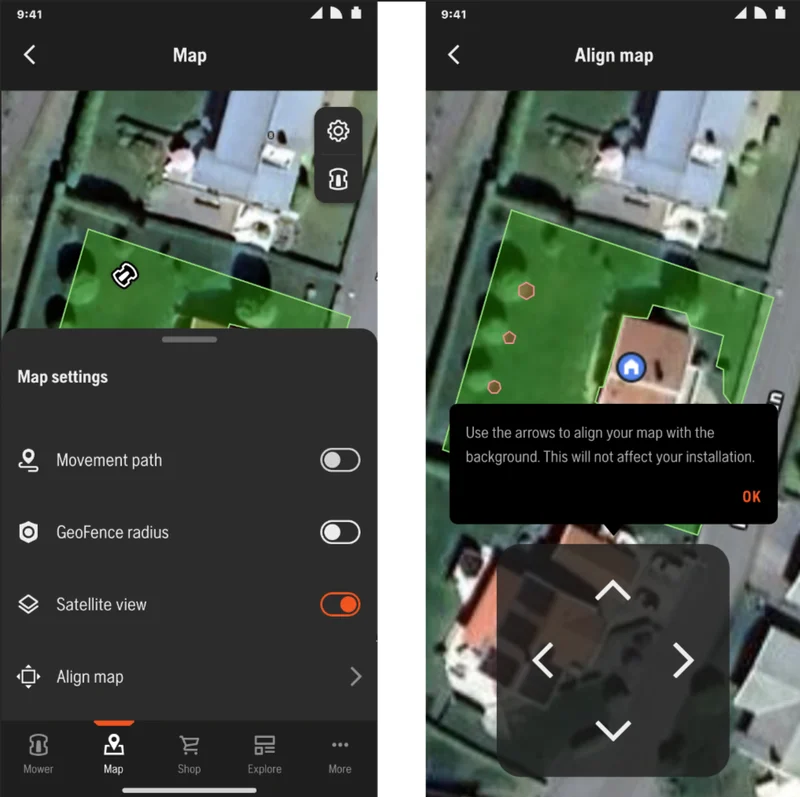
The Align map feature in the app allows you to visually align the Google map with your Automower® AIM or EPOS installation. In the Automower® Connect app, navigate to Map > Satellite view. Use the arrows to align the map with the background. This will not affect your installation. This feature is currently only available on Android.