Skip to Content
Automower® support
How to adjust the corridor width in an Automower® installation
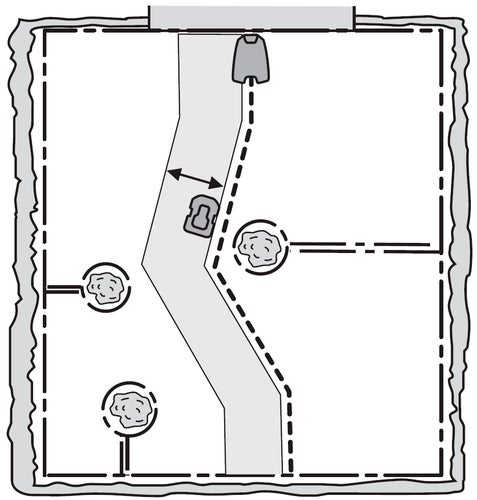
When following the boundary or guide wire to and from the charging station or through a passage, your Automower® robotic lawn mower runs at a variable distance from the wire to reduce the risk of tracks forming on your lawn. The area next to the wire, which the robotic lawn mower uses, is called a corridor.
Note that when the mower moves along the guide wire in the direction of the charging station, it always moves to the left of the guide wire.
With automatic passage handling, the width of the corridor is automatically adjusted, but the corridor width can be adjusted manually for several models, for example, if there is a narrow passage where the mower often gets stuck.
How to adjust the corridor width
The boundary wire corridor is the area adjacent to the boundary wire and the guide corridor is the area adjacent to the guide wire. Which of these corridor widths are available and can be adjusted depends on which Automower® model you have.
You can set the corridor width between 1 and 9. The factory setting is 6 for the boundary wire and 9 for the guide wire. If you set the value to 0, the robotic lawn mower will run right over the middle of the guide wire.
Mower display: Installation > Advanced > Corridor width
Automower® Connect: More > Settings > Installation > Corridor width