Skip to Content
Automower® support
How to change or recover the Automower® PIN code
Learn how to change, recover and troubleshoot PIN code issues on your Husqvarna Automower® robotic lawn mower.
When you know the PIN code
You can change the PIN code either on the robotic lawn mower or in the Automower® Connect app, depending on your lawn mower model.
In the Automower® Connect app:
Open the app and connect to your robotic lawn mower using Bluetooth®.
Go to Settings.
Tap Security and enter your current PIN code.
Select Change PIN code.
Enter your new PIN code.
Done! Your new code is now active.
On the mower’s display (older mowers with a keypad):
Press Menu on the robotic lawn mower keypad.
Select Security (lock icon).
Go to Advanced.
Select Change PIN code and enter your new code.
Done! Your new code is now active.
When you have forgotten the PIN code
You can recover your PIN code using the Automower® Connect app or by contacting a Husqvarna dealer.
Requirements for app recovery
Robotic lawn mower firmware from 10 December 2021 or later. Read our detailed article about Automower® firmware updates.
An active Bluetooth®, Wi-Fi, or mobile connection to the robotic lawn mower.
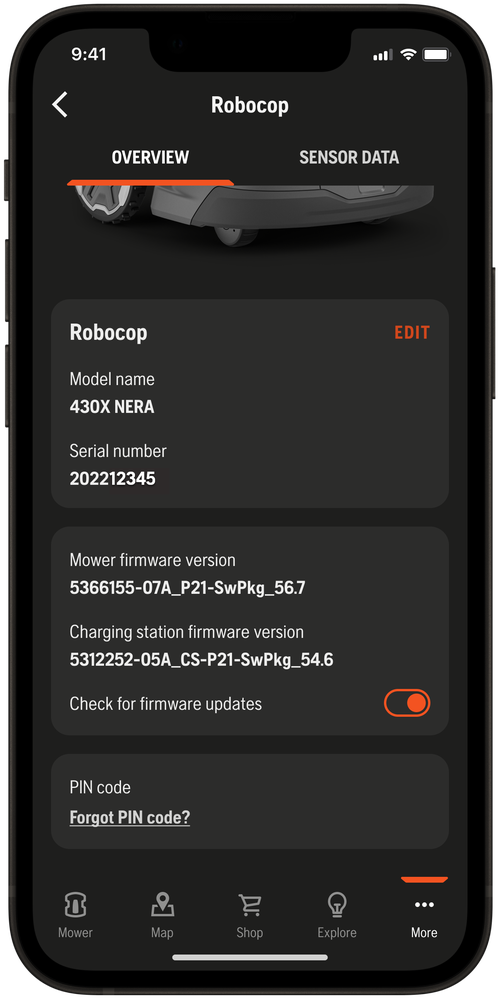
Option 1: From “Mower details” in the app
Open the Automower® Connect app and connect to your robotic lawn mower via Bluetooth®, Wi-Fi or mobile connectivity.
Go to More > My mowers.
Tap Mower details.
Scroll to Forgot PIN code and tap it.
The PIN will be emailed to all users linked to your Automower® Connect account.
Note: If a Bluetooth®, Wi-Fi or mobile connection to the robotic lawn mower is not possible, please contact your local Husqvarna® dealer to recover your PIN code.
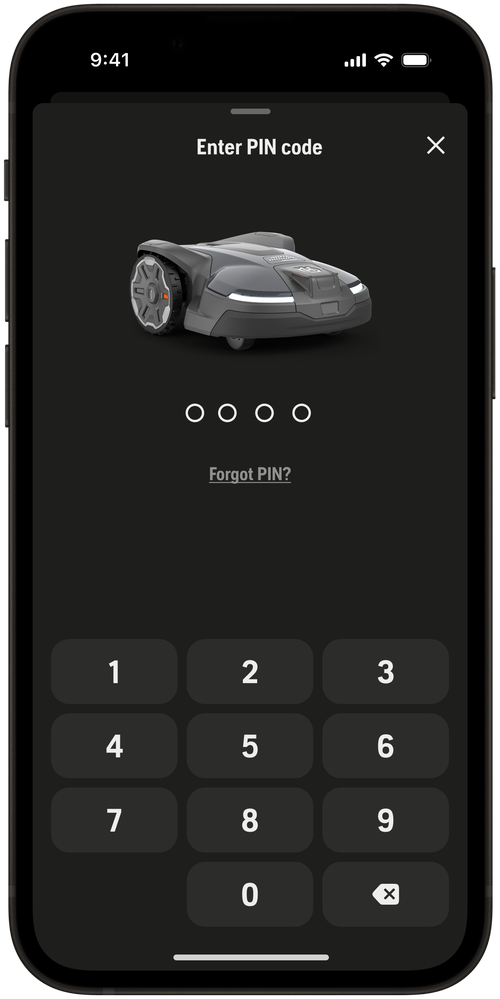
Option 2: From the PIN entry screen in the app
Open the Automower® Connect app and connect to your robotic lawn mower using Bluetooth®.
Go to More > Settings.
Tap Security or Automower® Connect.
When asked for the PIN, tap Forgot PIN code.
The PIN will be emailed to all users linked to your Automower® Connect account.
What happens if you enter the wrong PIN code
If you enter the wrong PIN five times in a row, the mower will lock for a period of time.
After 5 incorrect attempts, the mower locks for approximately 30 minutes.
Each additional wrong attempt after that increases the lock time further, up to a maximum of 4 hours.
There is no way to override the lock—you must wait until the timer on the display has expired before trying again.
An alarm may sound (depending on your settings). The alarm stops once the correct PIN is entered.
Troubleshooting PIN issues
If the correct PIN is rejected or some keypad buttons do not respond, the mower may have a technical issue that requires dealer assistance.
Correct PIN is rejected
If you are entering the correct PIN but the mower keeps rejecting it, try turning the mower off and on again.
Some keypad buttons do not respond
If one or more buttons on the keypad are unresponsive, making it impossible to enter your PIN, this is likely a hardware issue.
If the problem persists, contact your local Husqvarna dealer and bring your proof of purchase.
More information about the PIN code
When is the PIN code neededYou are asked to enter the PIN code when you:
Pair the mower with the Automower® Connect app.
Turn the mower ON.
After pressing the STOP button on the mower.
Access the Security settings in the Automower® Connect app.
Stop an alarm triggered by the theft protection system.
Remote steer the mower with appDrive (EPOS® installations).
Factory PIN code and how to enter itDepending on your model, the factory PIN code is either 0000 or 1234. You will be prompted to change this to a personal PIN code during the initial setup.
How to enter the PIN code
Models with a keypad: Use the number buttons on the keypad to enter your PIN code. Use the arrow buttons to navigate the menu.
Models with Automower® Access (jog wheel): Use the jog wheel to scroll to each digit and press the jog wheel to confirm each selection.
When you bought a second-hand Automower®Without the correct PIN code, you will not be able to operate the mower or connect it to your Automower® Connect account.
Start by contacting the previous owner to obtain the PIN code. If this is not possible, contact your local Husqvarna dealer for assistance. Bring your proof of purchase—a dealer requires a valid receipt to verify ownership before resetting access to the mower.
Note: The PIN code recovery options in the Automower® Connect app are only available to users already linked to the mower’s account and cannot be used to access a mower registered to a previous owner.