Skip to Content
Automower® support
Park your mower during rain with Automower® Smart Routines
While your Automower® robotic lawn mower can handle rain, your lawn will look better if not cut during heavy rain. With the Automower® Smart Routine Rain Guard, your mower will respond to real-time weather conditions in your area, returning to the charging station when precipitation is forecasted.

Supported lawn mowers
Automower® models with Wi-Fi or cellular connectivity (except Aspire R4)
Automower® models equipped with an Automower® Connect kit
Enable Rain Guard
Open the Automower® Connect app.
Tap the More button.
Select Smart Home.
Choose Automower® Smart Routines.
Enable Rain Guard by sliding the toggle button to the right.
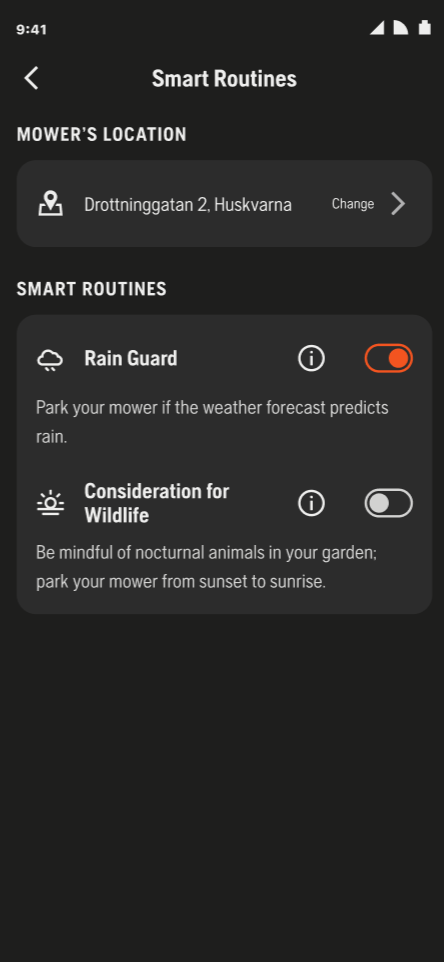
Resuming operation
The mower will start operating according to the schedule again the next full hour the weather does not meet the specified conditions. There may be a delay between when it starts raining and when the mower is parked, depending on when the Automower® Connect app synchronises with the weather service.
Disable Rain Guard
To disable Rain Guard, simply slide the toggle button to the left.
Weather conditions that will park the mower
The mower will be parked if the weather forecast meets the following conditions in the selected area:
Rain
Showers
Heavy rain
Please note that this feature relies on the weather forecast, which may not always match actual weather conditions.
How do I know if a Smart Routine has parked my lawn mower?
Sometimes your Automower® robotic lawn mower might be parked even though it’s scheduled to mow. The reason could be a Smart Routine—like Rain Guard or Consideration of Wildlife. In those cases, you’ll usually see a message on the Automower® Connect app explaining why, such as 'Set by Rain Guard'.
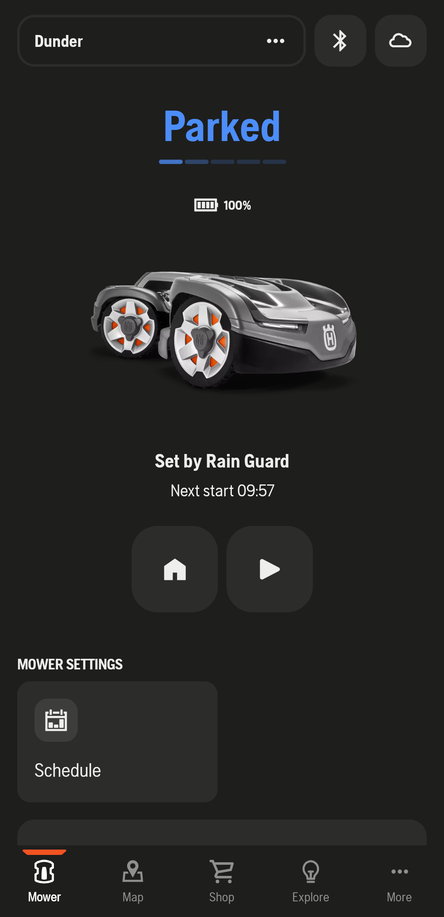
If you have an older Automower® model, the app might not show a reason. It will just stay parked without any extra information.