Skip to Content
Petrol-powered Hedge Trimmer support
How to clean a hedge trimmer air filter—fix power loss and starting issues
A dirty air filter restricts airflow and can cause:
Loss of engine power
Problems starting up
Overheating
Increased fuel consumption
Cleaning the air filter regularly keeps your Husqvarna hedge trimmer running efficiently.
Quick answer
To clean your air filter:
Remove the air filter cover
Take out the filter
Clean or replace it
Reinstall and test
Follow the steps below for the correct method.
Safety first
Before starting:
Wear protective gloves
Disconnect power (battery or spark plug)
Allow the machine to cool
What you need
Soft brush or cloth
Warm soapy water (for foam filters)
Air filter oil (if required)
Using proper cleaning methods helps maintain airflow and performance.
Step-by-step: clean the air filter
Learn how to clean the air filter
Remove the air filter cover
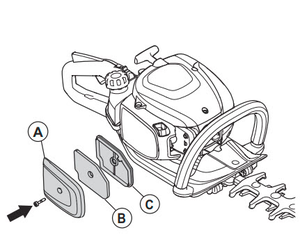
Locate the air filter housing
Release the cover (clip and screw)
This gives access to the filter
Take out the air filter
Carefully remove the filter
Check for dirt, dust or damage
Clean the filter
For foam filters:
Wash in warm soapy water
Rinse thoroughly
Let it dry completely
For paper filters:
Tap gently to remove dirt
Replace if heavily clogged
A clean filter ensures proper airflow to the engine.
Apply air filter oil (if required)


Apply a small amount of oil
Distribute evenly
This improves filtration and protects the engine.
Reinstall the filter
Place the filter back
Secure the cover properly
Test the hedge trimmer
Start the machine
Check for improved performance
Signs your air filter needs cleaning
Engine loses power
Hard to start
Excessive fuel use
Rough running
These are common signs of restricted flow.
Common mistakes to avoid
Installing a wet filter
Using the wrong oil
Ignoring heavily damaged filters
Skipping regular cleaning
How often should you clean it?
Every 25 hours of use
More often in dusty conditions
Regular cleaning prevents performance issues and engine wear.
Related guides
Why does my hedge trimmer start and then die?
Clean and lubricate hedge trimmer blades
Hedge trimmer maintenance guide
Still having issues?
If performance does not improve:
Check fuel system, spark plug or cooling system
Contact your local authorised Husqvarna service dealer