Skip to Content
Petrol-powered Hedge Trimmer support
Why is my hedge trimmer overheating? How to clean the cooling system
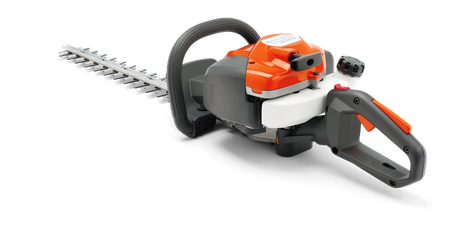
IF your Husqvarna hedge trimmer is getting too hot, losing power or shutting off during use, the cooling system may be blocked.
Dust, grass and debris can restrict airflow, causing the engine to overheat.
Quick answer
If your hedge trimmer is overheating:
Check for clogged air vents
Clean dirt and debris from cooling fins
Ensure proper airflow around the engine
Follow the steps below to clean the cooling system.
Safety first
Before cleaning:
Wear protective gloves
Disconnect power (battery or spark plug)
Allow the machine to cool completely
What you need
Soft brush or cloth
Compression air (optional)
Avoid using water directly on engine components.
Step-by-step: clean the cooling system
Learn how to clean the cooling system
Locate the air intake and cooling areas
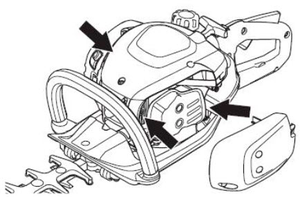
Find the air vents and cooling fins around the engine housing
These areas allow heat to escape during operation.
Remove visible debris
Brush away dirt, grass and dust
Focus on air intake openings
Blocked vents reduce airflow and cause overheating.
Clean cooling fins
Use a brush or compressed air
Remove buildup between fins
Cooling fins must be clean to dissipate heat effectively.
Check airflow paths
Ensure nothing is blocking air circulation
Inspect covers and openings
Reassemble and test
Make sure all parts are properly in place
Start the machine and check performance
Signs your cooling system needs cleaning
Engine gets hot quicky
Power drops during use
Machine stops after running briefly
Strong heat from engine area
These are common signs of restricted airflow.
Common mistakes to avoid
Ignoring blocked air vents
Using water on engine parts
Cleaning while the machine is hot
Skipping regular maintenance
How often should you clean it?
After heavy use
When working in dusty or dirty conditions
As part of regular maintenance
Regular cleaning prevents overheating and extends engine life.
Related maintenance
Why does my hedge trimmer start and then die?
Still overheating?
If your hedge trimmer continues to overheat after cleaning:
Check air filter condition
Inspect fuel system
Look for internal issues
Contact your local authorised Husqvarna service dealer if the issue persists.